Sunday, March 11, 2012

Our Sputnik

After reading the article, What's Our Sputnik?, I asked my students and family this question.  I got an interesting list of responses.  Here are the most popular:

  • Discovery of human life on other planets
  • Discovery of water on other planets
  • An asteroid on a collision course with Earth
  • Imminent eruption of the Yellowstone Volcano

Their answers indicate that most people pull together in the case of startling or life-threatening events.  I think we need to make the average citizen understand that we are in danger.  Danger of losing our competitive edge.  Additionally, I think the effort to make change begins in our classrooms.  As teachers, we are in the most influential positions, because we work with the leaders of tomorrow.  McGinnis and Robert-Harris (2009) suggest that for curriculum to succeed, students need to be motivated to learn.  Difficult as it is, it is our jobs to find ways to help show our students the relevance between STEM education and their lives.

Reference

McGinnis, J. R. & Robert-Harris, D. (2009, September/October). A new vision for teaching science. Scientific American Mind, 62-67.

Sunday, December 4, 2011

Using Models

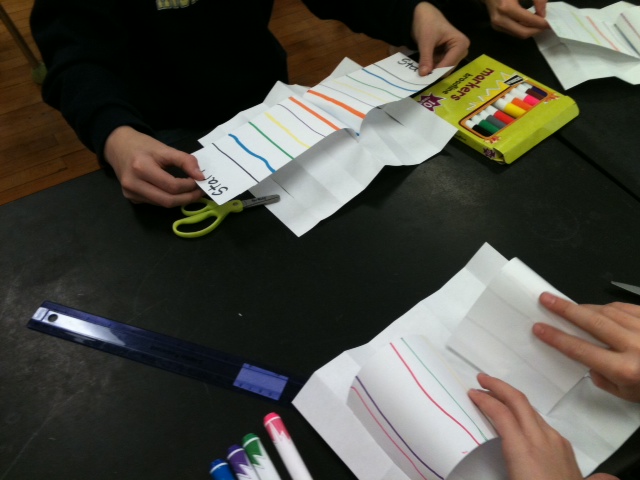
I had a difficult time deciding which lesson to do.  I do several lessons using models, but I wanted to do something new.  I found a model that demonstrates seafloor spreading.  My eighth grade students are currently covering space science, so I asked for volunteers from my seventh grade math class.  I got seven female volunteers.  The lesson went very well.  I think working in a small group allowed the students to express ideas freely.  We looked at animated models and then made our own.  Students really understood the process once they made their own models.  The models made it very clear that crust closest to the mid-ocean ridges is younger than crust farther from the ridges.  Students were so excited about the lesson they said that if there were more opportunities in the future, they would like to participate.  We really did not have any problems with the lesson.  Students did have a suggestion for making the model more efficient.  They suggested using legal size paper for the erupting seafloor so it would be easier to manipulate. 

I hope everyone else had a positive experience with their lesson plans.  Below are two pictures of the models we made.


Sunday, November 20, 2011

Natural Disasters

In my classroom I have a book about natural disasters.  What is unusual about the book is that it measures 3’ x 2’.  My students call it “Big Book”.  It is interesting to see students’ reactions when they look at the devastation caused by natural disasters.  In the eighth grade our curriculum does not include weather, but it does include earthquakes.  I use the book to show pictures of past natural disasters.

Although weather is not in our curriculum, I believe it is important for my students to be citizens of the world not just of the city where they live.  When a natural disaster occurs, I ask my students if they have heard or read about it.  Usually only about 1/3 of the students say they know what I am talking about.  This year I am using interactive science notebooks (ISN) for the first time.  While considering this blog post I decided that I will have students express their thoughts and feelings about natural disasters in their ISNs.  When we have class discussions, there are some students who are hesitant to verbally express their feelings.  Writing in their ISNs gives every student the opportunity to respond.  Some writing prompts may include, “What do you know about the science behind this natural disaster?”, “What do you think we need to do to prepare for these types of events?” and “How can be help victims of natural disasters?” Bringing in a speaker from the American Red Cross might be a way for students to hear first hand accounts from someone who has helped others during a natural disaster.

I am proud to say that our school does reach out to the community and the world.  We recently made Christmas shoe boxes for children in Haiti and collected canned goods for local families in need.  Expanding students understanding about their responsibilities as citizens of the world is one way to make the world a better place for all of us.

Saturday, November 12, 2011

Where Freshwater Meets Saltwater

Here is a picture of the inquiry "Where Freshwater Meets Saltwater."  I did this with 7th grade students without too much mess.  If you would like to use this with younger students, I would suggest doing it as a demonstration.  I left it on my desk for several days because the whole school was talking about it and other students and teachers stopped in to see it.  It is a great way to talk about brackish water and density.

Saturday, September 24, 2011

Ask A Scientist

Well......I guess everyone knows by now that Ask A Scientist takes quite some time to respond to questions.  Actually, I had a difficult time even submitting my question.  By the way, my question was, "How is a person's DNA affected if he/she receives an organ or bone marrow transplant."  I tried several times to sumbit my question while using Internet Explorer.  Each time the screen timed out before the question was submitted.  I finally tried using Safari, and it worked right away.

Considering there is so much information on the web, and the amount of time it takes to get an answer back, I am not sure that Ask a Scientist is something I would use with my students.  There are sights (like NASA) where you can partner with an engineer or scientist.  They will work with you throughout the school year to answer questions or direct you to places where you can find answers.  I think this is a much better arrangement for my middle school students.

Thanks to a Walden classmate, Kelly Roberson, I found the answer to my question.  If you would like to know the answer, just go to  http://www.thetech.org/genetics/ask.php?id=208  Thanks Kelly!

Have a great week!

Sunday, September 11, 2011

Web 2.0 Exploration

It is hard to believe how many tools there are on  the web!  I could have spent all day viewing what was available.  The two tools I selected to review are Prezi and Museum Box.  I liked both pieces of software.  Another web tool I found this summer allows you to create cartoons.  I used it for my handouts for the first day of school.  I told my students we would be using it in class.  They were very excited.  Here is that website:  MakeBeliefsComix.com.  Give it a try!

Feature
Prezi
Museum Box
Ease of Use
From my initial experience the software seems fairly easy to use.  It is not as user-friendly as some software I have used.  You have to remember were all the features are. 
With practice I am sure I will get to know more complex features.
This software seemed very easy to use.  You do not have to remember so much to begin making a box.  The software guides you through the process.  This might be a good software to use with my students.
Features
Theme wizards, ability to borrow from editable prezis, ability to add URLs.

The software creates a box.  You decide the number of slots in the box.  You pull out each box or cube and decide what to put on each face.  You can put text, video, or pictures.
Reliability
Having never used Prezi until now, I spoke with several people who use it.  They say it very reliable and they like the fact that you do not need the software to show the presentation.
In order to use this software you have to register your school.  If your students submit work, it may take up to five days until you view it.  This would probably not be good for our class presentation.
Training
Tutorials and manuals available and easy to use
There is a brief tutorial at the beginning, and use the help menu as you go along.
Equipment Requirements
Prezi’s website says you can run prezis from most contemporary computers.  Browsers supported include (Internet Explorer 7 and above, Firefox 3 and above, Chrome, Safari, Opera)
The website supports the following browsers for Windows:  Internet Explorer, Netscape Navigator and Mozilla Foxfire.  You also need Adobe Flash Player, Adobe Reader and Microsoft Word.
Collaboration
Easy to collaborate or file share
You can view others presentations but you cannot share files.
Cost
Free version for teachers
It is free for students and teachers.
Accessibility
Accessible from home and school
Accessible from home and school.
Multi-media capabilities
Can imbed photos and videos from YouTube
Can imbed pictures, photos, and videos.
Motivational Factors
After viewing several of the prezis on the website I found the presentations to be professional and interesting to watch.  I think you need to be careful not to have so much movement that your audience experiences motion sickness!
I viewed some of the museum boxes on the website.  They were very interesting, and I think they would be fun for students to create.


Just as a note, my brother is the director of career services for a local university.  He uses Prezi all the time.  He said it is really easy and fun to use once you get the hang of it!  I am looking forward to seeing what software others have reviewed.

Have a great day!

Sunday, June 12, 2011

Conservation of Energy & 21st Century Skills

The topic I chose is the law of the conservation of energy.  Basically, the law states that although energy can change forms, it cannot be created or destroyed.  This law touches all parts of science so it is important for students to have a thorough understanding of it.

Websites

My favorite website to use with my students is called Powering our Future.  It can be accessed at http://www.poweringourfuture.com/students/index.html.  This website provides fifteen energy transformation animations, information about bioenergy, and careers that deal with energy.

Another favorite website is The Physics Classroom.  This address takes to you an example of a rollercoaster http://www.physicsclassroom.com/mmedia/energy/ce.cfm.  Students really enjoy the animations on this website.

During my search, I found this website http://galileo.phys.virginia.edu/Education/outreach/8thGradeSOL/EnergyBallFrm.htm which was developed by the University of Virginia Physics Department.  It has a variety of experiments to use with students to demonstration the conservation of energy.

Activity

I have used the Powering our Future website with my students.  First, we discuss the different forms of energy.  Students like to give examples.  Sometimes we even play charades to guess which example a group of students is trying to demonstrate.  Next, we list examples of energy transformations in different branches of science.  For example, someone may suggest that in the life science field, we convert chemical potential energy (food), to kinetic energy (running a race).  At this point we go to the computer lab to explore the website.  I have students go to energy transformations link.  Students work independently and go through each of the fifteen animations to see if they can answer the questions.  After they are done, they compare answers with their group.  Next, students explore the bioenergy link.  Finally, we explore the energy conservation careers link.  When they are finished, students share the career that most interested them from the list.  If time permits, students do further research on that career.

Challenges

Probably the biggest challenge I face when using this technology is getting time in the computer lab.  We have two computer labs in our school, but one is primarily used for tech classes.  The other is available for everyone; however, our language arts department seems to sign up for a great deal of time which prevents others from getting to use it.  Our science lab does have some computers but not enough for all students in a class. When I use this lab, I must have two activities going on at the same time.  We usually take two days in the lab.  One day half of the students work on the computer assignment and half work on a lab.  The second day we switch.

Conclusion

I believe it is important for students to have 21st literacy skills.  Having students learn while using technology is an important part of my classroom curriculum.  I am fortunate enough to have a SmartBoard which allows my students to have access to the Internet on a daily basis; however I really do like them to have a chance to explore with technology on their own.